You can turn a product photo you already have into a short video. Pick one sharp photo with the whole product in frame, choose a single move, such as a slow turn, a light sweep or a hand picking it up, and render a clip. On Sisif one 5-second portrait clip costs $1, has no watermark and is silent.
The five clips at the top of this page were each made from one product photo. Under each clip is the exact sentence that made it.
What you need
- One product photo you have the right to use. Your own shoot, or a supplier image you are licensed to use.
- The whole product in frame. A cropped product can only be shown cropped, because the photo is the first frame of the clip.
- Sharp focus and even light. Detail in the photo becomes detail in the clip, and harsh highlights are more visible once things move.
- A plain or simple background. It keeps the label readable while the product moves.
- A place for the clip. The file is a 9:16 portrait MP4 at 540x960, a shape made for product pages on phones, Reels, TikTok, Shorts and story ads.
How to turn a product photo into a video in 5 steps
- Pick the photo. Choose the shot that already sells: front view, label visible, nothing cut off at the edges. Whatever faces the camera in the photo is what faces the camera in the clip.
- Choose one move. The moves are a small turn, a hero reveal (a soft light sweep), in use (a hand picks the product up and sets it down), unboxing, and a close pass across the surface. One move per clip keeps the product recognisable.
- Upload and render. Upload the photo on the AI product video maker, choose the move and pay $1 for the clip. Most clips are ready in 2-5 minutes, and you get an email when yours is done.
- Check it frame by frame. Look at the label, the logo, the shape and the colour. If the render fails, the credits go back to your account on their own and you can try again.
- Finish and publish. The file has no text and no sound. Add the price, the offer or a music track in the editor you already use, then upload the clip wherever you sell.
Real examples: the photo, then the clip
Every clip above started as a single still photo of a product. The small turn stays near the front, so the label is always readable. The hero reveal moves the light, not the product. The in-use clip adds a hand for scale and keeps the label clear of the fingers. The unboxing clip lifts the product out of its box and sets it on the table. The close pass moves the camera toward the surface to show the material.
Clothing works the same way. Here is a pair of wide-leg flare jeans: the product photo on the left and a frame from the clip made from it on the right.
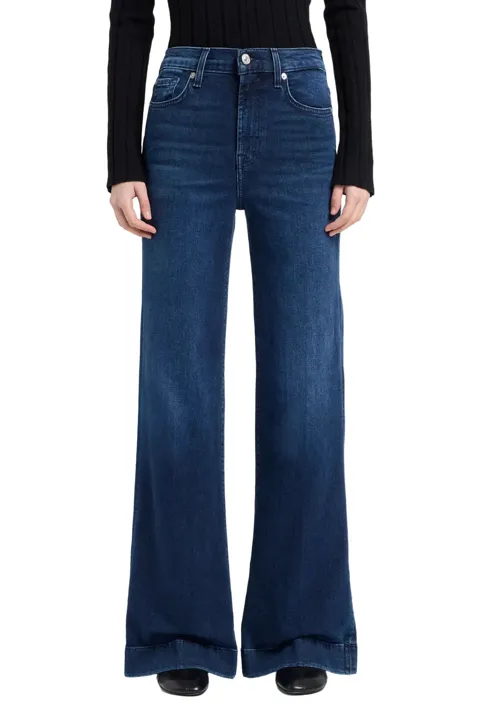
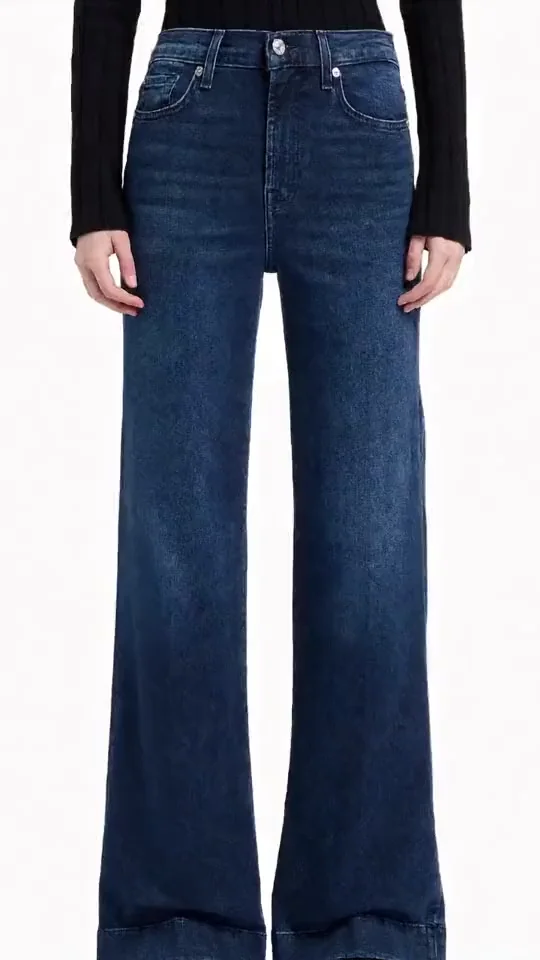
Selling clothing on Shopify? See four more pairs, each a product photo next to its clip, on clothing product videos from one photo.
Which move fits which product
| Product type | Move | What it shows |
|---|---|---|
| Bottles, jars, packaged goods | Hero reveal | The label stays facing the camera while the light moves |
| Shoes, bags, objects with depth | Small turn | Depth, without turning far enough to invent the back |
| Handheld items, tools, gadgets | In use | Scale, with a hand in the frame |
| Gifts and boxed items | Unboxing | What arrives when the box is opened |
| Fabric, wood, ceramics | Close pass | The texture of the material |
This table is guidance based on what each move shows. It is not a measured result.
Photo checklist before you upload
- Sharp, not soft or small.
- The whole product inside the frame, with some room around it.
- The label or front facing the camera.
- Even light, without blown-out highlights or hard reflections.
- No price stickers, watermarks or text on top of the photo. Add text after the export instead.
- A portrait or square crop, so the 9:16 frame does not cut the product off.
Other guides give much the same advice on source photos. Photoroom puts clear product visibility, sharp details and accurate colour first. Shoupapp says the photo you start from, the format and how you describe the movement matter more than the tool.
Where a 5-second clip fits, and where it does not
It fits the media gallery of a product page, Instagram Reels, TikTok, YouTube Shorts and story ads, where 9:16 is the native shape. It also fits an ad where you add the offer as text in your ad tool.
Check the spec first on any marketplace listing. Each platform publishes its own minimum length and resolution, and these change.
It does not fit on its own as a Google Merchant Center product video. Google's video link attribute requires videos between 6 and 240 seconds and at least 720p, and a single 5-second 540x960 clip is below both.
What it costs
One clip is $1 for 5 seconds at 540x960, paid once. You do not need a subscription. Credits never expire, a failed render returns its credits, and commercial use is included. Buyers in the EU, the EEA and the UK see VAT added at checkout. Each new move from the same photo is a new clip at the same price. See pricing or work out a budget with the AI video cost calculator.
Doing a whole catalog
One photo makes one clip, so a catalog is the same checkout repeated. To automate it, the Sisif API accepts an https image URL on POST /api/videos/generate/, and you poll the clip until its status is READY. The n8n automation page shows a workflow built on the same API.
If you want to move a portrait or a family photo instead of a product, read how to animate a photo.
Frequently asked questions
Can I turn a single product photo into a video?
How long is the video?
What size is the clip?
Is the clip silent?
Is there a watermark?
Can I use the clip in ads and on my store?
Can I get several moves from one photo?
What happens if a render fails?
Try it on sisif
Render a clip
One photo, one move, a 5-second portrait clip for $1.